


- Introduction
- Registration
- Using Advanced Installer
- GUI
- Working with Projects
- Installer Project
- Patch Project
- Merge Module Project
- Updates Configuration Project
- Windows Store App Project
- Modification Package Project
- Optional Package Project
- Windows Mobile CAB Projects
- Visual Studio Extension Project
- Software Installer Wizards - Advanced Installer
- Visual Studio integration
- Alternative to AdminStudio/Wise
- Replace Wise
- Migrating from Visual Studio Installer
- Keyboard Shortcuts
- Shell Integration
- Command Line
- Advanced Installer PowerShell Automation Interfaces
- Features and Functionality
- Tutorials
- Samples
- How-tos
- FAQs
- Windows Installer
- Deployment Technologies
- IT Pro
- MSIX
- Video Tutorials
- Advanced Installer Blog
- Table of Contents
- Introduction
- Registration
- Using Advanced Installer
- GUI
- Working with Projects
- Installer Project
- Patch Project
- Merge Module Project
- Updates Configuration Project
- Windows Store App Project
- Modification Package Project
- Optional Package Project
- Windows Mobile CAB Projects
- Visual Studio Extension Project
- Software Installer Wizards - Advanced Installer
- Visual Studio integration
- Alternative to AdminStudio/Wise
- Replace Wise
- Migrating from Visual Studio Installer
- Keyboard Shortcuts
- Shell Integration
- Command Line
- Advanced Installer PowerShell Automation Interfaces
- Features and Functionality
- Tutorials
- Samples
- How-tos
- FAQs
- Windows Installer
- Deployment Technologies
- IT Pro
- MSIX
- Video Tutorials
- Advanced Installer Blog
- Table of Contents
Registry Value Dialog
In this tab you can configure specific installation actions or behavior rules for registry entries.
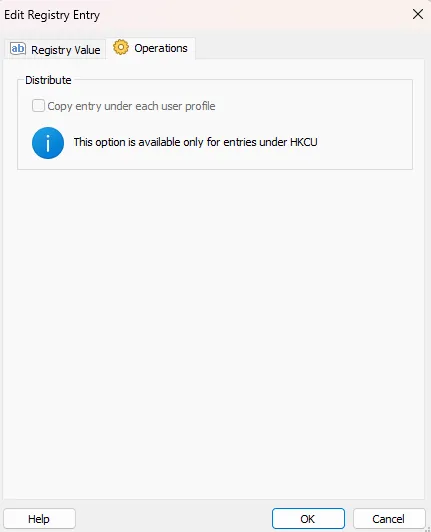
Distribute
Copy entry under each user profile
 This option is only available for entries under HKCU
Check this option to duplicate the registry entry across all user profiles on the target machine during installation.